Isabella: a website theme for working photographers
Isabella is a portfolio and journal theme for photographers who take client bookings. Your name fills the top of the homepage above a configurable grid of selected work, while an availability status and booking card show whether you are available, taking limited commissions, or fully booked. Project pages can present each commission as a compact case study, with fields for the client, location, and scope beneath the title. Use the Story layout for personal series, field notes, and journal posts. Isabella works well for wedding, portrait, travel, documentary, and commercial photographers, whether you work independently or run a small studio.
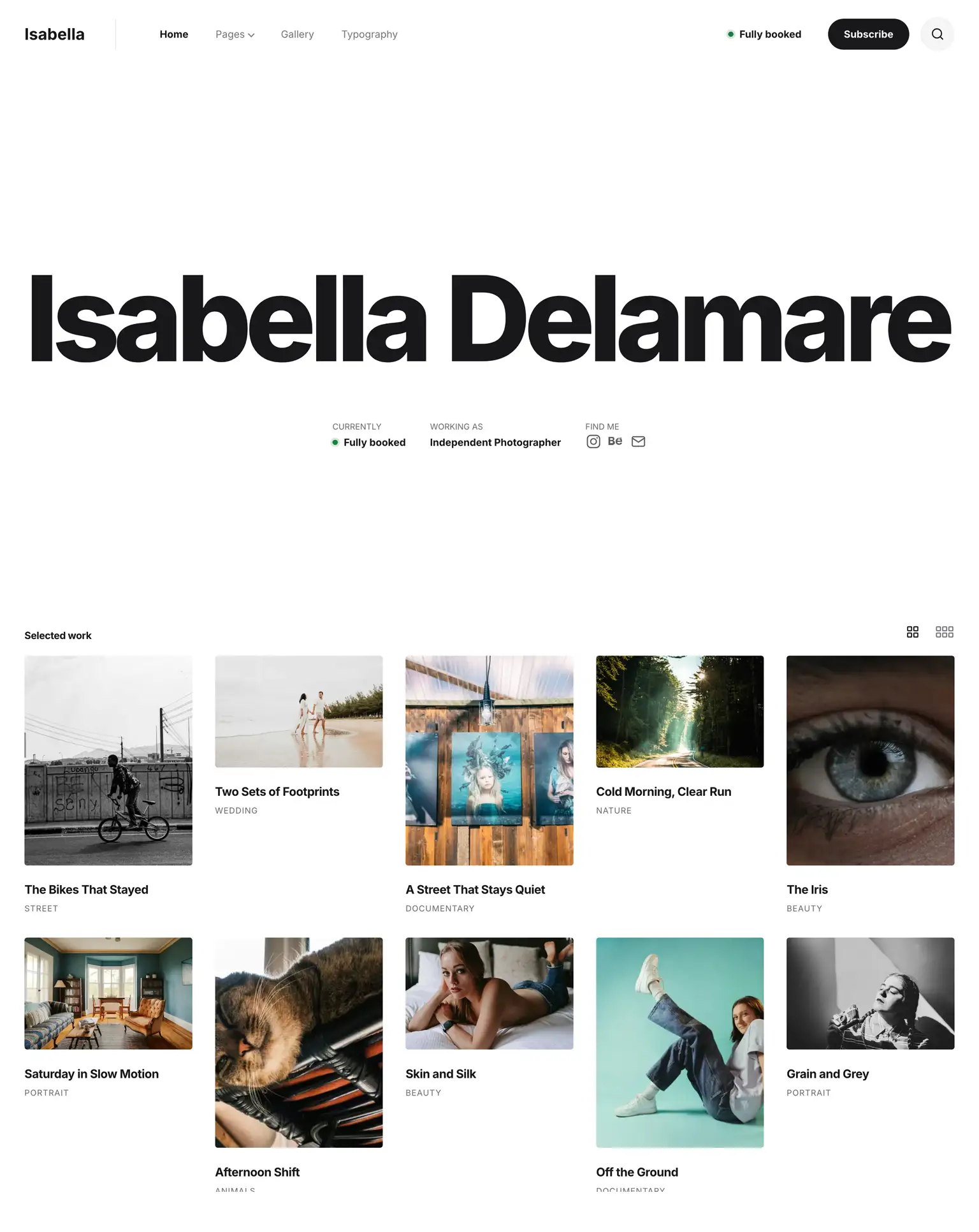
Your website has two kinds of visitors. Clients want to see the work and know whether you can take their job; everyone else comes for the pictures and the stories behind them. The top of the homepage is for the client, and the rest of the page goes to the photographs.
If a gallery with detailed control over the grid and the cards matters most to you, Photos is the closer fit.
Homepage
- Your name as the masthead, scaled to fill the width, with its size limit, weight, spacing and alignment in the settings
- A facts row under the name: your availability and your own details
- Follow icons for Instagram, Behance, Vimeo, YouTube, Pinterest, LinkedIn, Facebook, X and email, under your name and in the footer
- Selected work from the latest posts, featured posts, chosen tags, or posts and pages you pick
- Quick view: a photograph opens in place with its caption and story link, and visitors move through the set with arrows, a swipe or the keyboard; switch it off and each photograph links straight to its post
- A newsletter block for Mailchimp or your own form code
Photo grid
- 4 frame styles: Natural, Rhythm, Uniform 4:5 and Masonry
- 1 to 6 columns, set separately for phones, tablets and desktops
- 4 entrance motions (Settle, Crop, Print, Drift) or none
- A density switch that shows visitors more photographs at once
- The same grid on the blog page and, if you choose, on tag and author pages
Posts and pages
- 3 post layouts: Story, Showcase and Showcase cover
- 4 page layouts: the same three plus an empty container
- The Story photograph in any of 7 ratios or your own, set separately for phones and larger screens
- A line above each title for the series or the client, written per post or page
- 3 project facts under a Showcase title, with labels you name (client, location, scope)
- A Showcase bar with a link back to the tag, a share button and a link to the project online
- Captions and photo credits under the featured photograph
- A byline with the author’s portrait, the date, the reading time and a share button
- Related posts in 2 or 3 columns, and child pages as cards under their parent
- Typography for long reads: drop caps, block quotes, tables, notice boxes and buttons in 4 styles
- Image galleries in posts
- 4 Custom HTML slots before and after posts and pages
Archives
- Tag and author pages as a photo grid or an editorial index of ruled rows
- Author pages with a portrait, a bio, the post count and a website link
- A tags page as cover cards or a list of names, with post counts and descriptions
- Numbered pagination, or newer and older links
- Full-screen search from the header bar, with its own results page
- A 404 page with a button back to your homepage
Availability
- A status in the header and under your name: available, limited or fully booked
- A card with a title, an intro, as many detail rows as you need and a booking button
Design
- Light, dark or automatic color scheme
- 12 colors per scheme, each with its own field
- Inter by default, or any of the 100+ variable fonts in Publii’s library
- Page width, text width, side margins and corner radius in the theme settings
- Smooth scrolling and parallax, switched off for visitors who prefer reduced motion
Ready to publish
- No coding: you set everything in the theme settings in Publii, and every option has a note that explains it
- Works with Publii’s plugins, eg: comments, reading time, search or sharing
- Responsive images up to 2560 px, and the first photograph loads before the rest
- Keyboard navigation in the menus, the quick view and the availability card
- Tested against WCAG 2.1 AA
- No jQuery and no CSS framework
* Plus VAT for EU customers
What's included
- Unlimited use - forever, on any number of domains
- 12 months of access to files and updates
- 3 months of premium support included
- 100% ready for personal and commercial use
- One-time payment - no automatic renewals, optional update access at 50% off
- Optimized for speed, SEO, and mobile experience
What's excluded
- Premium plugins are not included - available as a separate purchase
Details
- Author:
- Publii Team
- Version:
- Updated:
- Oct 20, 2026
Requirements and compatibility
- Browser:
- Edge, Firefox, Chrome, Safari, Opera
- Requirements:
- Publii 0.47.1 and up
Built for fast loading
Our themes use custom CSS and JavaScript without jQuery or a CSS framework. Publii generates your pages before publication, so your hosting serves finished HTML files. You can also choose system fonts to display text without downloading additional font files.
Learn more about performanceThree months of support included
Your purchase includes three months of support through our ticket system. Contact the Publii team for help with the theme's settings or to report a problem.
Read support termsPurchase FAQ
Find out what your purchase includes, how payments work and what happens when your update access expires.
Is this a subscription?
No. Every purchase is a one-time payment. We do not renew your access or charge you automatically. Your purchase includes 12 months of access to product files and updates and three months of technical support.
What happens when my 12 months of file and update access expire?
You can continue using the downloaded theme or plugin without a time limit, subject to its license terms. However, you will no longer be able to download the product or access new updates.
When your access expires, we will send you an email reminder. For the following 60 days, you can renew your access for another 12 months using the link in that email or the "Renew" option in your User Panel. A 50% discount is applied automatically during this renewal period.
After the 60-day renewal period ends, the discounted renewal option will no longer be available. To regain access to the product files and updates, you will need to purchase the product again at its regular price.
Renewal restores access to product files and updates for another 12 months but does not include a new technical support period.
If you need assistance after your included support period has ended, please contact our Customization Service.
How is VAT calculated, and can I receive an invoice?
Any applicable VAT is calculated during checkout based on the information you provide. The final price, including any applicable VAT, is displayed before you place your order.
To receive an invoice, select the "I want an invoice" option during checkout. Once issued, the invoice will be available in your User Panel, and we will notify you by email.
Are premium plugins included?
Premium plugins are not included with this theme. You can purchase them separately from the Publii Marketplace.
Can I cancel my purchase or request a refund?
Our products are digital content delivered immediately after payment. When delivery begins with your prior express consent and acknowledgment, you may lose your statutory right to withdraw from the purchase.
For full details, see our Terms and Conditions.