
LLMS.txt Generator
This plugin automatically generates an llms.txt file in your website's root directory to help large language models understand your site's structure and discover your most important content. It works during site generation, organizing your posts and pages into a clean markdown file that AI systems can parse instantly. You get complete control over what appears, in what order, and how it's labeled.
How does it work?
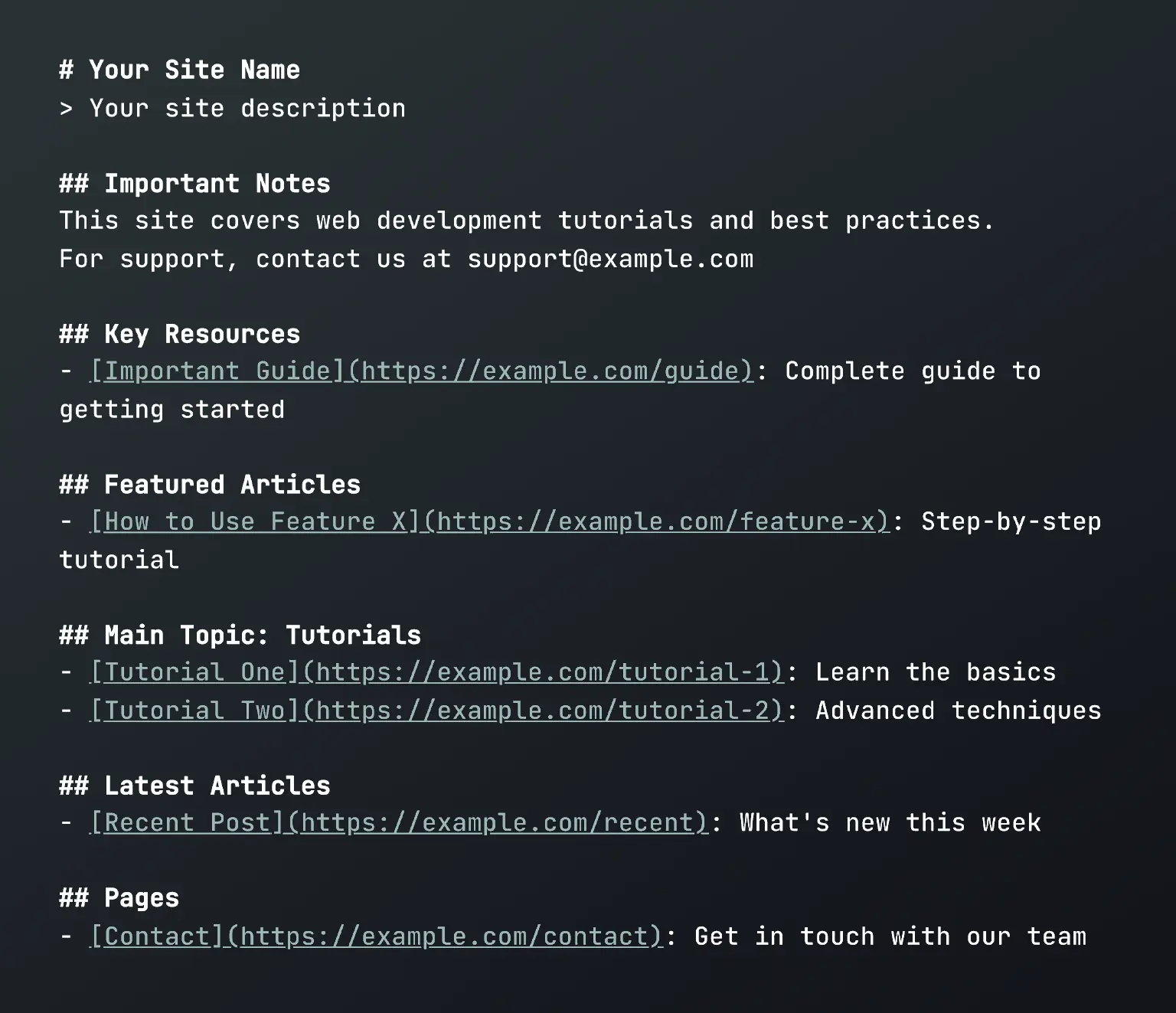
The LLMS.txt Generator plugin hooks into Publii’s rendering process and collects your published posts, pages, tags, and metadata. It then builds the llms.txt file section by section: manually curated key resources appear first, followed by featured articles, posts grouped by their main tags, latest articles, and pages. As the file is assembled, the plugin tracks every processed post and page to prevent unwanted duplicates between sections.
Using Markdown for AI plugin? LLMS.txt Generator detects it automatically and can link directly to available Markdown versions of your posts and pages. See how the integration works.
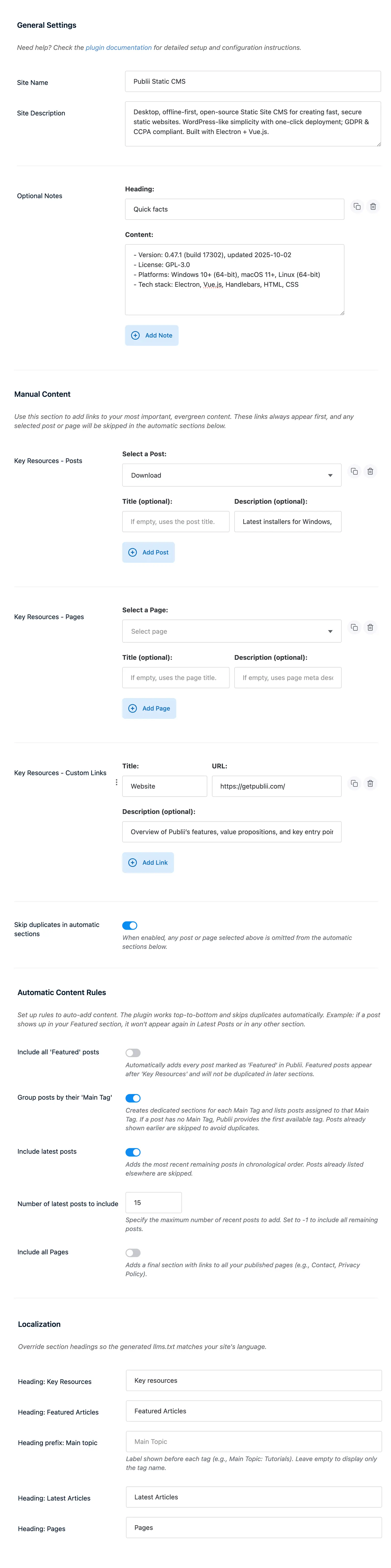
For descriptions, the plugin follows a practical fallback order. It starts with any custom description you provide, then checks the individual post or page meta description from Publii’s SEO settings, and finally uses an automatically generated excerpt. Before adding the text to the file, it removes HTML entities, line breaks, and unnecessary spacing so the result remains clean and readable.
The finished llms.txt file is placed in the root directory of your website, alongside index.html, and is available at yoursite.com/llms.txt. Everything happens while Publii generates the site. There is no runtime overhead or client-side JavaScript—just a static file that is updated with your website.
Key features:
- Manual Content Curation: Select important Publii posts and pages or add custom external links to create a Key Resources section that always appears first. Each entry can have its own title and description, giving you control over how cornerstone content is presented.
- Smart Duplicate Prevention: The plugin tracks content as each section is generated. If a post has already appeared in Key Resources, it can be skipped in Featured Articles, topic sections, and Latest Articles. Duplicate prevention can also be disabled when intentional repetition is useful.
- Automatic Content Organization: Include posts marked as Featured in Publii and organize other content into sections based on their main tags. If a post does not have a manually selected main tag, Publii uses the first assigned tag.
- Flexible Latest Posts Control: Choose how many recent posts should appear in the Latest Articles section. Set a specific limit for a compact list or use
-1to include every remaining post that has not already appeared elsewhere. - Markdown-Aware Links: The Prefer Markdown Links option works with the Markdown for AI plugin. When both plugins are active, available posts and pages can point directly to their clean
.mdversions. If a Markdown file is unavailable, the original HTML address is retained automatically. - Optional Introductory Notes: Add custom sections before the automatically generated content. These can contain disclaimers, support information, a summary of the site’s subject, or other useful context. Lines beginning with a hyphen are formatted as Markdown list items.
- Complete Fallback System: The site name and description can come from custom plugin settings, Publii’s global SEO settings, or the regular site configuration. Posts and pages follow a similar fallback order for their descriptions, ensuring that the file remains useful even with minimal setup.
- Language Customization: Change the headings used for Key Resources, Featured Articles, Main Topics, Latest Articles, and Pages. This makes the generated file suitable for websites published in different languages.
- Granular Section Control: Featured Articles, tag grouping, Latest Articles, and Pages can be enabled or disabled independently. You can build a completely curated file, rely on automatic sections, or combine both approaches.
Works with Markdown for AI
LLMS.txt Generator and Markdown for AI handle two related parts of content discovery:
- LLMS.txt Generator creates a concise index that introduces the website and organizes links to its most useful resources.
- Markdown for AI creates clean Markdown versions of individual Publii posts and pages.
When both plugins are active, enable Prefer Markdown Links to use those Markdown documents in llms.txt. The option is enabled by default, and no manual connection between the plugins is required.
Before changing a link, LLMS.txt Generator checks whether the corresponding .md file was actually created. If a post or page is marked noindex, excluded through the Markdown for AI settings, or otherwise has no Markdown representation, its original HTML address is used automatically.
This applies to posts and pages added through the automatic sections as well as Publii content selected manually for Key Resources. Custom URLs and external resources are never changed.
The integration also works in the other direction. When Markdown for AI detects an active LLMS.txt Generator plugin, each generated Markdown document includes a short notice pointing back to the main llms.txt content index. This gives content tools both a website-level overview and a direct path to the complete text of individual resources.
Both plugins can still be used independently. If Markdown for AI is inactive or a particular Markdown file is unavailable, LLMS.txt Generator continues using normal HTML links without interrupting site generation.
Why consider this plugin?
- Clearer Content Discovery: The file gives AI tools and content agents a concise introduction to your website and a structured list of the resources you consider most useful.
- Support for an Emerging Format: The
llms.txtproposal provides a simple, Markdown-based way to present website content to language models. Read our complete guide to llms.txt to learn how the format works and whether it is useful for your website. - Minimal Maintenance: Once configured, the file is rebuilt automatically during site generation. New posts can appear in the appropriate sections, descriptions remain current, and you do not have to maintain the file manually.
- Control Over Structure: Instead of publishing a simple chronological list, you can prioritize key resources, organize content by topic, control the number of recent articles, and decide which sections should appear.
* Plus VAT for EU customers
What's included
- Unlimited use - forever, on any number of domains
- 12 months of access to files and updates
- 3 months of premium support included
- 100% ready for personal and commercial use
- One-time payment - no automatic renewals, optional update access at 50% off
Details
- Author:
- Publii Team
- Version:
- Updated:
- Aug, 12 2026
Requirements and compatibility
- Browser:
- Edge, Firefox, Chrome, Safari, Opera
- Requirements:
- Publii 0.47.x and up

Get 3 months of professional support
Getting started with a new plugin on a new website can be a challenge, but our experts are here to help. Every purchase of the commercial plugin includes three months of support through our dedicated ticket system, so you'll have efficient and effective assistance with any issues you run into.