
Simple Lightbox Gallery
Simple Lightbox Gallery turns native Publii galleries into responsive VenoBox 2 lightboxes with swipe gestures, keyboard navigation, captions, downloads, link copying, and native sharing on supported browsers. Customize the controls, colors, preloaders, and transitions, while locally bundled assets load only on posts and pages that contain a gallery.
A lightweight VenoBox gallery for Publii
Simple Lightbox Gallery uses the locally bundled VenoBox v.2 library to open native Publii galleries in a responsive lightbox. Its image handling preserves the natural proportions of taller photographs and lets visitors scroll them when fitting the entire image into the viewport would make it too small.
You can also make images fit the available height, set their maximum width, and choose whether multiple galleries remain separate or become one continuous slideshow.
Key features
- VenoBox 2 integration: Uses the locally bundled VenoBox 2.2.0 library without an external CDN, service, or account.
- Responsive image handling: Preserve the natural dimensions of taller images or resize them to fit within the viewport height.
- Flexible gallery grouping: Keep each Publii gallery as a separate slideshow or combine all galleries on the page.
- Multiple navigation methods: Browse images using previous and next buttons, keyboard arrows, swipe gestures, or an optional infinite loop.
- Independent controls: Show or hide navigation, the image counter, native sharing, image downloads, and link copying separately.
- Captions: Display captions from native Publii galleries and choose their position and visual style.
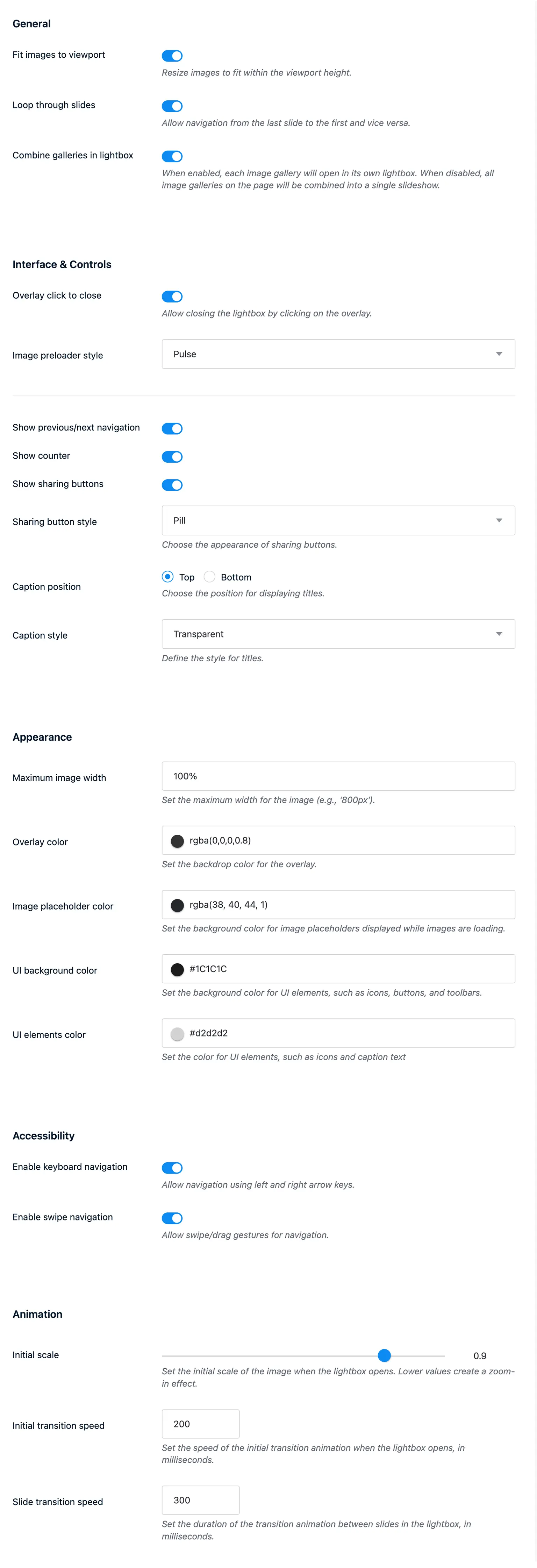
- Custom appearance: Adjust the overlay, image placeholder, interface background, control colors, maximum image width, and opening scale.
- Preloader selection: Choose from 12 loading animations, including Pulse, Wave, Circle, Fold, and Wander.
Match the lightbox to your theme
Appearance settings cover the overlay color, image placeholder, interface background, and control color. You can also set the maximum image width and choose whether captions and sharing controls use a block, pill, bar, or transparent style.
Animation settings control the initial image scale, opening transition duration, and slide navigation speed. Visitors who prefer reduced motion automatically receive a simplified version without the configured scaling and slide animations.
Controls, captions, and sharing
Navigation arrows, the image counter, native sharing, downloads, copied links, and captions can be enabled separately. This gives you control over the interface without adding controls that your gallery does not need.
The native Share button is displayed only when the visitor’s browser supports the Web Share API. It may not appear in Publii preview mode or in some desktop browsers and generally requires the published website to use HTTPS. Download and Copy link are configured independently.
Interface labels and messages can be translated in the plugin settings. This includes the gallery dialog, previous and next buttons, close, share, download and copy controls, loading status, image loading error, fallback image description, copied-link confirmation, and counter separator.
Performance and accessibility
The plugin adds its CSS and JavaScript only to posts and pages where Publii reports gallery content. All required assets are served locally from the website.
The lightbox uses native buttons, keyboard navigation, dialog semantics, accessible control names, visible focus indicators, and focus restoration when the gallery closes. Alternative text from the gallery thumbnail is preserved for the full-size image, while loading and error states are announced to assistive technology.
Theme compatibility: This plugin requires a Publii theme released on December 10, 2024, or later. In most cases, this means version 2.1.0.0 or 3.1.0.0. Custom and older themes may need an update. Read the Publii gallery plugins guide for details.
What you get
- Unlimited use - forever, on any number of domains
- Free to use for both personal and commercial projects
- Community support through the forum
Details
- Author:
- Publii Team
- Version:
- Updated:
- Aug, 23 2026
Requirements and compatibility
- Browser:
- Edge, Firefox, Chrome, Safari, Opera
- Requirements:
- Publii 0.43.x and up