
Hyvor Talk Comments
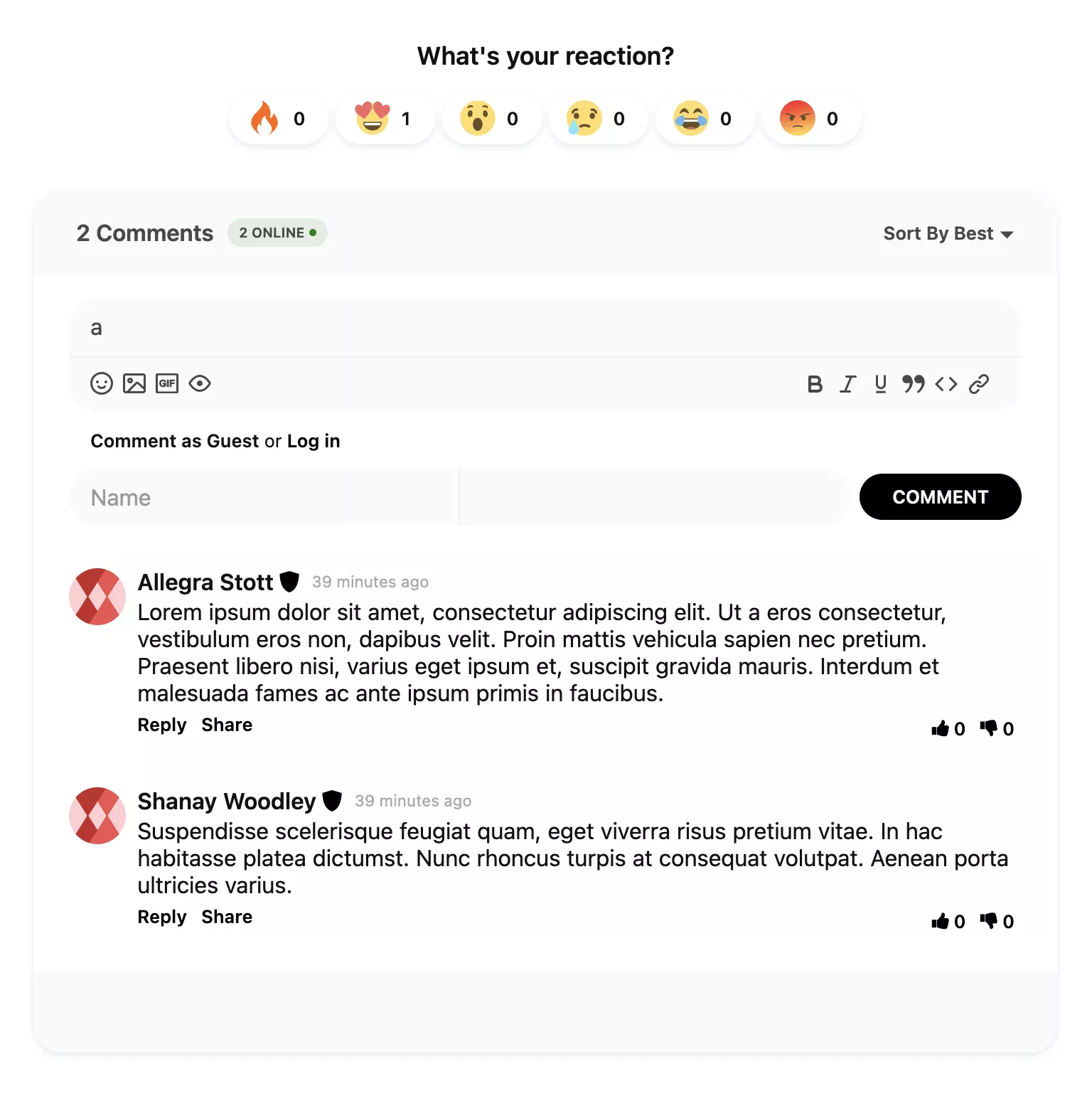
Hyvor Talk is a hosted, privacy-focused commenting system that lets readers respond to your articles and join real-time conversations on your website. The Hyvor Talk Comments plugin connects the service to Publii posts and pages using your Website ID. You can customize the comment area, enable lazy loading, and control when the external script loads through Publii’s built-in Cookie Banner.
Add Hyvor Talk comments to site
Give readers a place to ask questions, share ideas, and continue the conversation after each post. The Hyvor Talk Comments plugin connects Publii to Hyvor Talk’s current v3 comments embed and places it in the comment area provided by your theme.
The plugin handles the integration for you. Add your Website ID, choose where Publii displays comments, and publish the site. Each post and page receives a stable identifier, which keeps its Hyvor Talk thread connected if you change the page URL.
Before you start: The Publii plugin is free. Hyvor Talk is a paid third-party service that requires a separate account and active plan. New Hyvor accounts include a 14-day trial, and plan limits may change over time. Check the current Hyvor Talk pricing before you begin.
Why use Hyvor Talk with Publii?
Hyvor Talk provides the discussion and moderation tools, while the Publii plugin connects them to your content and site settings. Together, they give you a flexible comment system that fits the way a Publii website works.
- Turn readers into participants
Add real-time discussions, replies, votes, reactions, and ratings to your content. Readers can format comments, upload images, find GIFs, embed links, mention other users, and add highlighted code blocks. - Keep discussions under control
Manage comments, users, IP addresses, and individual pages from the Hyvor Talk Console. Moderation tools include banning, shadow banning, trusted users, custom badges, featured comments, automated rules, and spam detection through Akismet or FortGuard. - Protect performance and visitor choice
Delay the comments embed until a visitor scrolls near it, or block the external Hyvor Talk script until the visitor accepts the cookie group selected in the plugin settings.
Plugin features
- Add Hyvor Talk comments to Publii posts and pages.
- Connect the integration with your Hyvor Talk Website ID.
- Use the current Hyvor Talk v3 Web Component and module script.
- Assign a stable Hyvor Talk
page-idto each Publii post and page. - Supply the current page URL to Hyvor Talk.
- Add a custom comments heading and choose its heading level.
- Set CSS classes for the outer container, inner container, and heading.
- Load comments when the section enters the visitor’s viewport.
- Block the Hyvor Talk script until the visitor accepts a selected Publii Cookie Group.
- Set separate messages for disabled JavaScript and pending cookie consent.
- Show a placeholder instead of loading the external embed in Publii Preview.
Hyvor Talk features
- Real-time comments with guest and account-based commenting.
- Upvotes, downvotes, reactions, and page ratings.
- Rich-text comments with images, GIF search, link embeds, Markdown-style shortcuts, and code highlighting.
- Support for more than 30 languages.
- Light and dark color palettes, custom interface text, and custom CSS.
- Email notifications and user mentions.
- Comment, user, IP, and page moderation.
- Automated moderation rules and spam detection.
- Privacy-focused, ad-free embeds.
- Data export, APIs, and webhooks.
Hyvor Talk controls these service features. Availability and usage limits depend on your Hyvor Talk plan.
Frequently Asked Questions
These answers cover the main questions about pricing, compatibility, existing comment threads, cookie consent, and theme integration.
- Is the Hyvor Talk Comments plugin free?
Yes. You can use the Publii plugin on personal and commercial websites. Hyvor Talk is a separate paid service with its own plans and usage limits. - Does the plugin support both posts and pages?
Yes. Version 2.0.0 added page support, and version 3.0.0 continues to support comments on both Publii posts and pages. - Will existing comments remain after updating to version 3.0.0?
The previous Publii plugin used the Publii post or page ID to identify each thread. Version 3.0.0 passes the same value through Hyvor Talk’spage-idattribute, so existing threads remain connected. Custom integrations that used another identifier may require a thread migration in Hyvor Talk. - Do I have to use the Publii Cookie Banner?
No. Cookie Banner integration is optional. Enable it when you want Publii to block the external Hyvor Talk script until the visitor accepts the assigned cookie group. - Why do comments not appear in Publii Preview?
The plugin skips the live Hyvor Talk embed in preview mode and displays a placeholder. This prevents external requests and misleading embed errors during local preview. Test comments on the generated or published website. - Can I match the comments section to my theme?
Yes. The plugin lets you change the heading text and level, plus the CSS classes used by the surrounding Publii containers. Hyvor Talk provides separate appearance controls for the embed itself.
Download the free Hyvor Talk Comments plugin, add your Website ID, and give readers a place to discuss every post and page you publish with Publii.
What you get
- Unlimited use - forever, on any number of domains
- Free to use for both personal and commercial projects
- Community support through the forum
Details
- Author:
- Publii Team
- Version:
- Updated:
- Sep 25, 2026
Requirements and compatibility
- Browser:
- Edge, Firefox, Chrome, Safari, Opera
- Requirements:
- Publii 0.46.x and up